


Form 1040 is the main federal tax form you use to file your taxes with the IRS each year. Understanding how the form is organized and what information you need can help you file correctly and avoid common mistakes.
Whether you prepare your own taxes or work with a tax professional, knowing what Form 1040 looks like and what each section asks for can make the process easier and less stressful during tax season.
Key takeaways
- Form 1040 is the main tax return form for reporting all income, claiming deductions, and calculating your final tax liability or refund
- The 1040 tax form 2026 follows a simplified two-page structure with additional schedules attached for specific types of income or deductions
- Most taxpayers need to attach at least one schedule to their 1040 based on their income sources and tax situation
- Filing deadlines, income thresholds, and reporting requirements remain consistent with previous years unless Congress passes new legislation
What is the IRS 1040 tax form?
The IRS uses your 1040 tax form as a complete yearly statement that details the amount of income and deductions (as well as credits), and total tax due that includes tax paid in advance before the due date. All individual taxpayers who are required to file an Individual Tax Return because of their level of income, must submit a Form 1040 (or its variations).
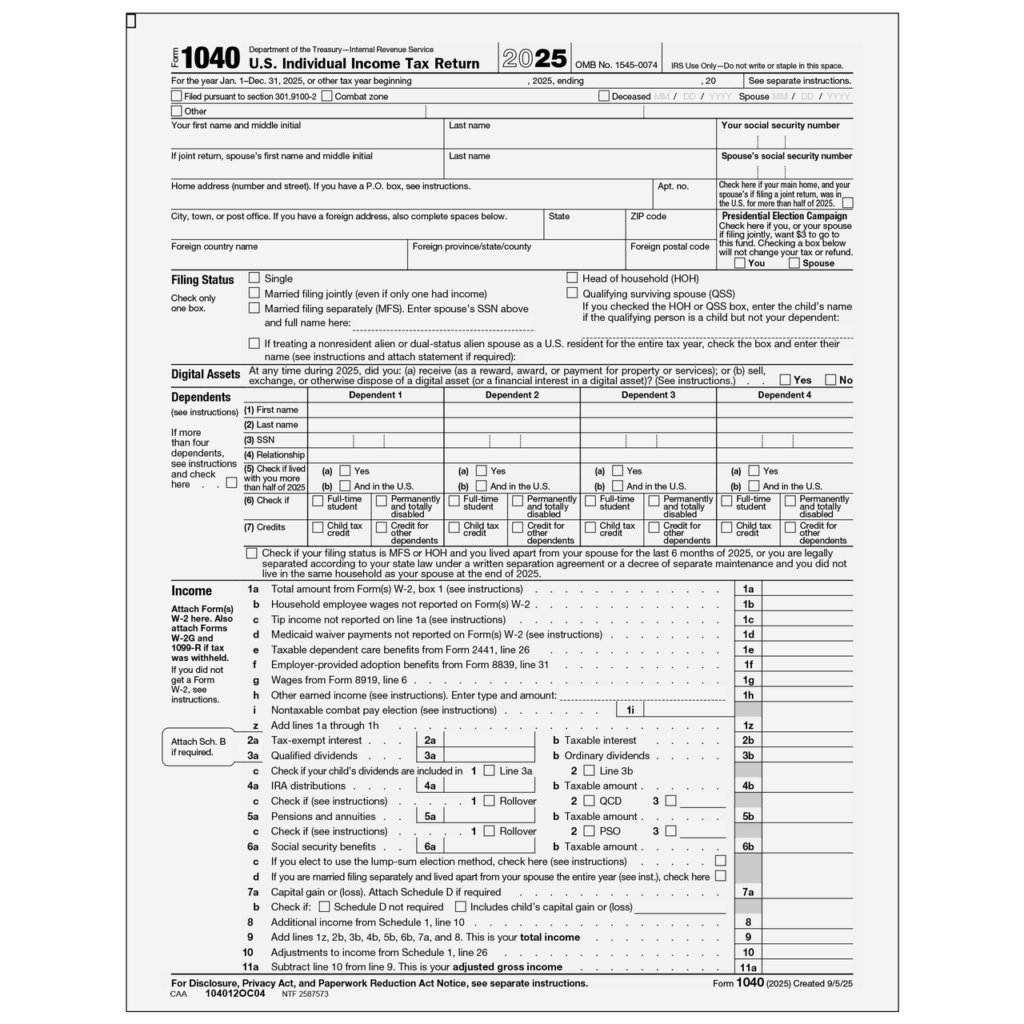
The form collects information about wages, investment income, business profits, retirement distributions, and other sources of money you received during the tax year. It also captures deductions that reduce your taxable income and credits that directly lower your tax bill.
💡 Is Outsourcing Right for Your Firm?
Take our quick self-evaluation to assess whether outsourcing or offshoring fits your firm’s goals.
Instantly discover how it can impact cost savings, capacity, and growth potential.
No commitment. Just tailored insights in less than 2 minutes.
Who must file Form 1040
The following need to file the Form 1040:
- Single filers under age 65 who earned more than $14,600 in 2026
- Married couples filing jointly who earned more than $29,200 together in 2026
- Self-employed people who made more than $400 in net profit, no matter their age or filing status
- Anyone who meets the IRS income limits for the current tax year, since these limits can change because of inflation
Check with the current year’s listings to see if you qualify to file, even if your income remained relatively stable.
What does a 1040 form look like in 2026
Form 1040 or the US Individual Income Tax Return for the year 2026 has a two-page format that has been simplified & adopted by IRS in past years. In the first page you enter all of your personal information, report all of your income, and calculate your Adjusted Gross Income.Â
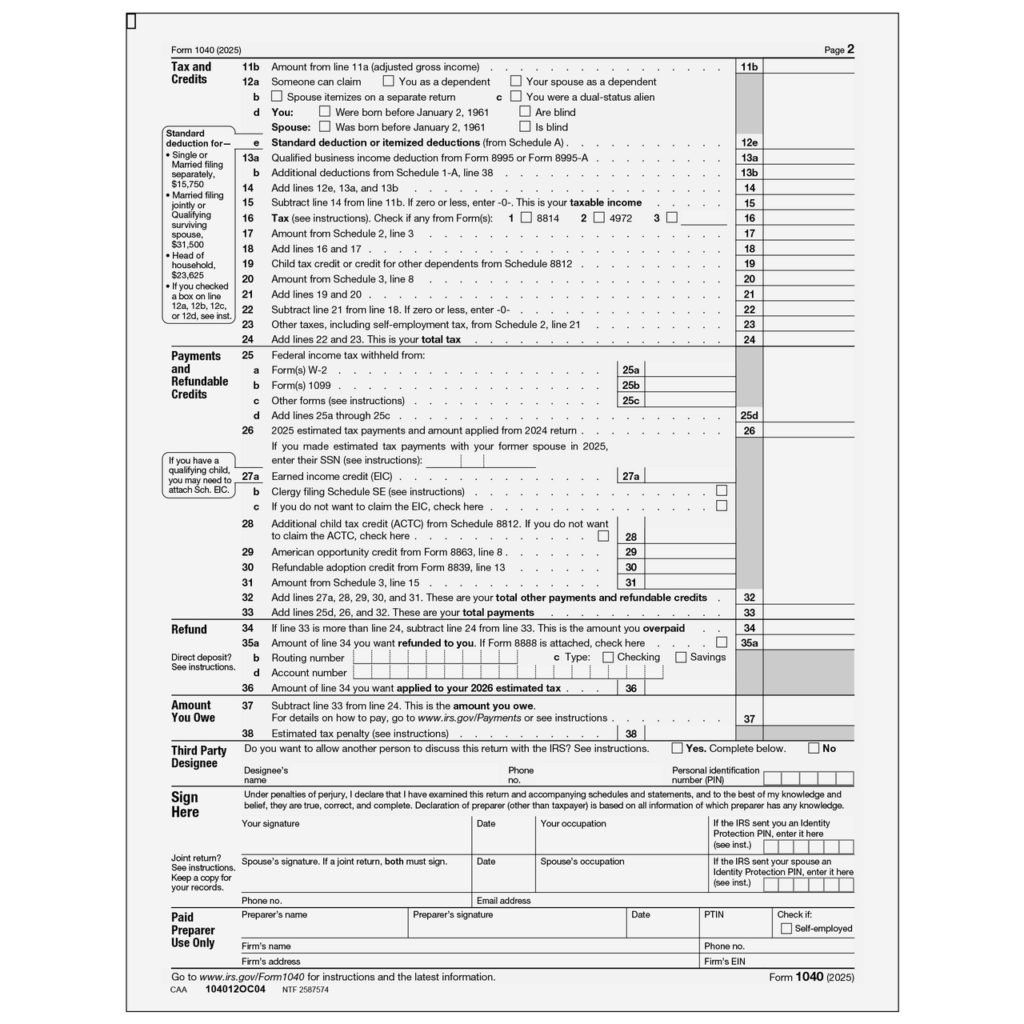
On the second page you will enter your deductions, credits, total tax due, payments made, & whether you are receiving a refund or owe any taxes.
Page one sections
For your tax return you will see your filing status, personal information such as your full name, full address and your social security number at the top of your return. Underneath that is a dependents section which identifies any dependents you have by name, relationship to you, and their social security numbers.
Under the income section you will see all types of income (e.g., income earned from employment W-2 Forms, interest income, dividends, business income, capital gain, distribution from retirement plans, social security) aggregated into your total income.Â
Your adjusted gross income (AGI) will be determined by adding all income (as listed above) and then substracting out specific deductions/adjustments (i.e., student loan interest; IRA contributions; health savings accounts).
Page two sections
You have the option of using the standard deduction or itemised deductions – however, most taxpayers will elect to take the standard deduction since it will typically provide a larger tax benefit than if they were to itemise. As an example, in 2026 you would have a $15,000 deduction if you are single vs a $30,000 deduction if you are married and file jointly.
Your taxable income is equal to your Adjusted Gross Income after you have subtracted your deduction from it, the amount of which is then taxed using tax rates. After that, you will subtract any tax credits such as child tax credit, earned income credit, and educational credits; this results in your overall tax liability.
The payments section will include a sum total of all federal tax that has been withheld from your paychecks as well as any quarterly estimated tax payments that you have made and any other credits/payments made against your total federal tax liability; comparing this total to the total payments will allow you to determine whether or not you will receive a refund or whether you owe any additional taxes.

Common schedules attached to the form 1040
Most taxpayers need to attach one or more schedules to provide detailed information about specific income types or deductions.
Schedule 1 – Additional income and adjustments
Reports income not captured on the main form like unemployment compensation, gambling winnings, or jury duty pay. Also lists adjustments to income including educator expenses, moving costs for military, and self-employment tax deduction.
Schedule 2 – Additional taxes
Covers alternative minimum tax, excess advance premium tax credit repayment, and self-employment tax for business owners and independent contractors.
Schedule 3 – Additional credits and payments
Reports credits not listed on Form 1040 like foreign tax credit, education credits, and residential energy credits. Also shows estimated tax payments and amounts applied from previous year returns.
Schedule A – Itemized deductions
Required if you itemize instead of taking the standard deduction. Lists medical expenses, state and local taxes, mortgage interest, charitable contributions, and other qualifying deductions.
Schedule B: Interest and dividens
Interest and dividend income over $1,500, plus foreign account reporting questions.
Schedule C – Business income
Self-employed individuals and sole proprietors report business revenue, expenses, and net profit or loss. This schedule feeds into the main 1040 form.
Schedule D – Capital gains and losses
Reports sales of stocks, bonds, mutual funds, real estate, and other capital assets. Calculates short-term and long-term gains or losses that affect your tax liability.
Filing requirements and deadlines for 2026
The standard filing deadline for 2026 tax returns is April 15, 2027. If April 15 falls on a weekend or holiday, the deadline shifts to the next business day.
Extension options
File Form 4868 by the April deadline to receive an automatic six-month extension until October 15. This extends your filing deadline but not your payment deadline. You must still pay estimated tax owed by April 15 to avoid penalties and interest.
Electronic filing vs. paper filing
Electronic filing through tax software or a tax professional offers faster processing, quicker refunds, and immediate confirmation that the IRS received your return. Paper returns take 6-8 weeks to process compared to 2-3 weeks for e-filed returns.
The IRS encourages electronic filing and direct deposit for refunds. Most tax preparation software handles form selection, calculations, and schedule attachments automatically based on the information you provide.
Step-by-Step Process: How you can file the form 1040
Follow the below steps to file your form 1040 without any errors:
Step 1: Gather and organize client documents
Collect all income documents, including W-2s, 1099s, K-1s, and brokerage statements. Request deduction records like mortgage interest statements, property tax bills, and charitable receipts.
Step 2: Review prior year return and conduct client interview
Compare current information against last year’s return to spot changes. Ask about life events like marriage, home purchase, or job changes that affect taxes.
Step 3: Determine filing status and identify dependents
Choose the filing status that gives the lowest tax based on marital status. Verify dependent eligibility and collect Social Security numbers for everyone claimed.
Step 4: Enter income from all sources
Input wages, investment income, business profits, and retirement distributions into tax software. Report all income shown on tax documents to match IRS records.
Step 5: Calculate adjustments to income
Apply above-the-line deductions like IRA contributions, student loan interest, and self-employment tax. These adjustments reduce your adjusted gross income before other deductions.
Step 6: Determine standard vs. itemized deductions
Calculate itemized deductions on Schedule A, including mortgage interest, taxes, and charitable gifts. Compare to the standard deduction and use whichever amount is higher.
Step 7: Apply tax credits
Check eligibility for child tax credit, earned income credit, education credits, and other credits. Credits reduce your tax bill dollar-for-dollar and provide direct savings.
Step 8: Calculate tax liability and compare to payments
Apply tax rates to taxable income to find total tax owed. Subtract withholding and estimated payments to determine refund or balance due.
Step 9: Review for accuracy and completeness
Run software diagnostics to catch errors or missing information. Verify Social Security numbers, bank details, and attached schedules before client approval.
Step 10: File electronically and provide client copies
Submit the return through IRS e-file for faster processing. Give the client complete copies and confirmation of acceptance.
Download the official IRS Form 1040 below.
Download Form 1040
Common form 1040 mistakes to avoid
When filing the form 1040, make sure to avoid the below mistakes:
- Missing or incorrect information
Wrong Social Security numbers, misspelled names, or incorrect bank account numbers for direct deposit create processing problems. Double-check all personal information before submitting your return.
Forgetting to sign
Unsigned returns get rejected. Electronic returns require a PIN or prior year AGI for signature verification. Paper returns need physical signatures from both spouses if filing jointly.
Missing income reporting
The IRS receives copies of your W-2s, 1099s, and other income documents. Omitting income triggers notices and potential audits. Report all income, even if you didn’t receive a form.
Claiming incorrect filing status
Your filing status affects your standard deduction, tax brackets, and credit eligibility. Choose the status that gives you the lowest tax liability while following IRS rules for qualification.
Get expert help filing your form 1040
Form 1040 and its schedules can be confusing, especially when tax laws change or your financial situation becomes more complex. Datamatics Business Solutions takes the guesswork out of tax preparation. We make sure every line is filled out correctly, every deduction you qualify for gets claimed, and your return gets filed on time. You avoid costly mistakes while we handle the details.
What's the difference between Form 1040 and 1040-SR?
Form 1040-SR is designed for taxpayers 65 and older with larger print and a standard deduction chart, but it contains the same information as Form 1040.
Can I file Form 1040 if I'm self-employed?
Yes, self-employed individuals file Form 1040 and attach Schedule C to report business income and expenses, plus Schedule SE for self-employment tax.
Do I need to attach my W-2 to Form 1040 when e-filing?
No, e-filed returns don’t require W-2 attachments. Keep your W-2 for your records, but the information is transmitted electronically with your return.
What happens if I file Form 1040 after the deadline?
Late filing triggers penalties of 5% of unpaid taxes per month up to 25%, plus interest on any amount owed from the original deadline.
Can I amend Form 1040 after filing if I find a mistake?
Yes, use Form 1040-X to amend your return within three years of the original filing date to correct errors or claim missed deductions.